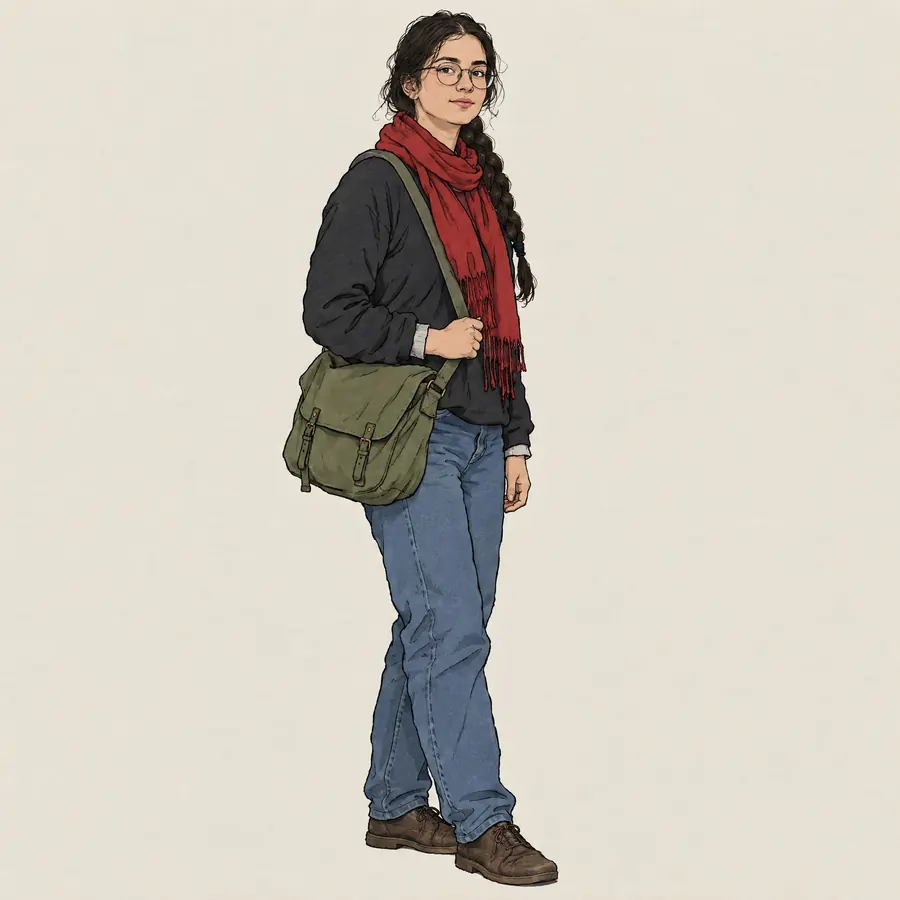
Xerographic Line
- xerox line
- photocopied line
- scratchy pencil line
The animator's own pencil line photocopied straight onto the cel, sketch marks and all.
Opens an image model with the prompt in it. The price is on the page before you sign in.
What it is for
Copying the pencil drawing directly onto the cel skipped the inker, which was faster and much cheaper. It also left the animator's actual hand in the finished frame, which no inked line ever does, and that roughness became a look people now ask for on purpose.
How it works
The rough drawing goes through a photocopier onto the clear sheet, so every construction line and every abandoned correction is reproduced with the final one. The line comes out grey and grainy rather than black and solid. Paint goes on behind, and it rarely fills exactly to a line that was never meant to be final.
When to use it
Use it when the hand should show and the picture should feel made rather than manufactured. Avoid it where legibility at a small size matters, because a scratchy line falls apart in a thumbnail.
Told apart from its neighbours
Storyboard Frame is rough for a different reason, and it carries frame furniture. Model Sheet is a technical document with several views. Cel Animation is what this replaced, with a clean inked line and paint filled exactly to it.
Where it is used
It suits anything that wants warmth and visible effort, and it is the quickest way to make a drawn character look handmade rather than generated.
- Studio features from the 1960s and 1970s
- Modern work that wants a visible hand
The prompt
Replace the blanks with your own character, keep the rest. Then run it on an image model.
<character>, xerographic line style, the drawing reproduced straight from a rough pencil original so every construction line and every correction stays visible, a scratchy uneven dark grey outline rather than a clean black ink one, flat pale colour inside it that does not quite fill to the line, visible sketch marks around the hands and the face, a slightly dirty reproduced quality over the whole picture
What goes wrong
A clean, confident illustration comes back. The fix is to ask for visible construction lines and corrections around the hands and the face, which is exactly where an animator draws most and erases least.
Leave out
a clean inked outline, a single confident line, perfectly filled colour, a polished finish
Watch for
Ask for the corrections to stay in. A model reads a rough line as a mistake and cleans it, so the surviving construction lines have to be named as something you want.
Questions
Draw it
Pay for the one run. No subscription, and the price is on the model page before you sign in.