How to Make Anime Movies: A Step-by-Step Production Guide
November 23, 2026 · 16 min read
You've got a script, a folder of character references, and a scene you can already picture in motion. Then you try to plan the whole film. Who draws the transitional frames? When should actors record? What happens when a character looks different in every generated clip?
Learning how to make anime movies means answering those production questions before you commit to finished animation. The drawings matter, but so do rights, handoffs, staffing, and revision costs. Build a process that lets you reject a weak idea cheaply, while it's still a sketch.
Table of Contents
- The Anime Movie Pipeline From Script to Master
- Separate design decisions from shot execution
- Commit scope before committing labour
- Lock the Script and Storyboard Before Animation
- Use a repeatable approval routine
- Make changes accountable
- Plan Shots by Drawing Count and Exposure
- Spend drawings where viewers need them
- Keep a shot register
- Staff the Crew and Plan Labor Capacity
- Assign responsibility in production order
- Book for the whole production
- Where AI Tools Fit in Each Production Stage
- Match assistance to the task
- Judge the accepted shot, not the generation
- Who Funds, Owns and Earns From the Film
- Compare the independent routes
- Settle permissions before production
- Fixing Schedule, Handoff and Consistency Problems
- Measure approval, not activity
- Protect the handoffs
- Make a One-Minute Pilot Before You Commit
- Set a real production gate
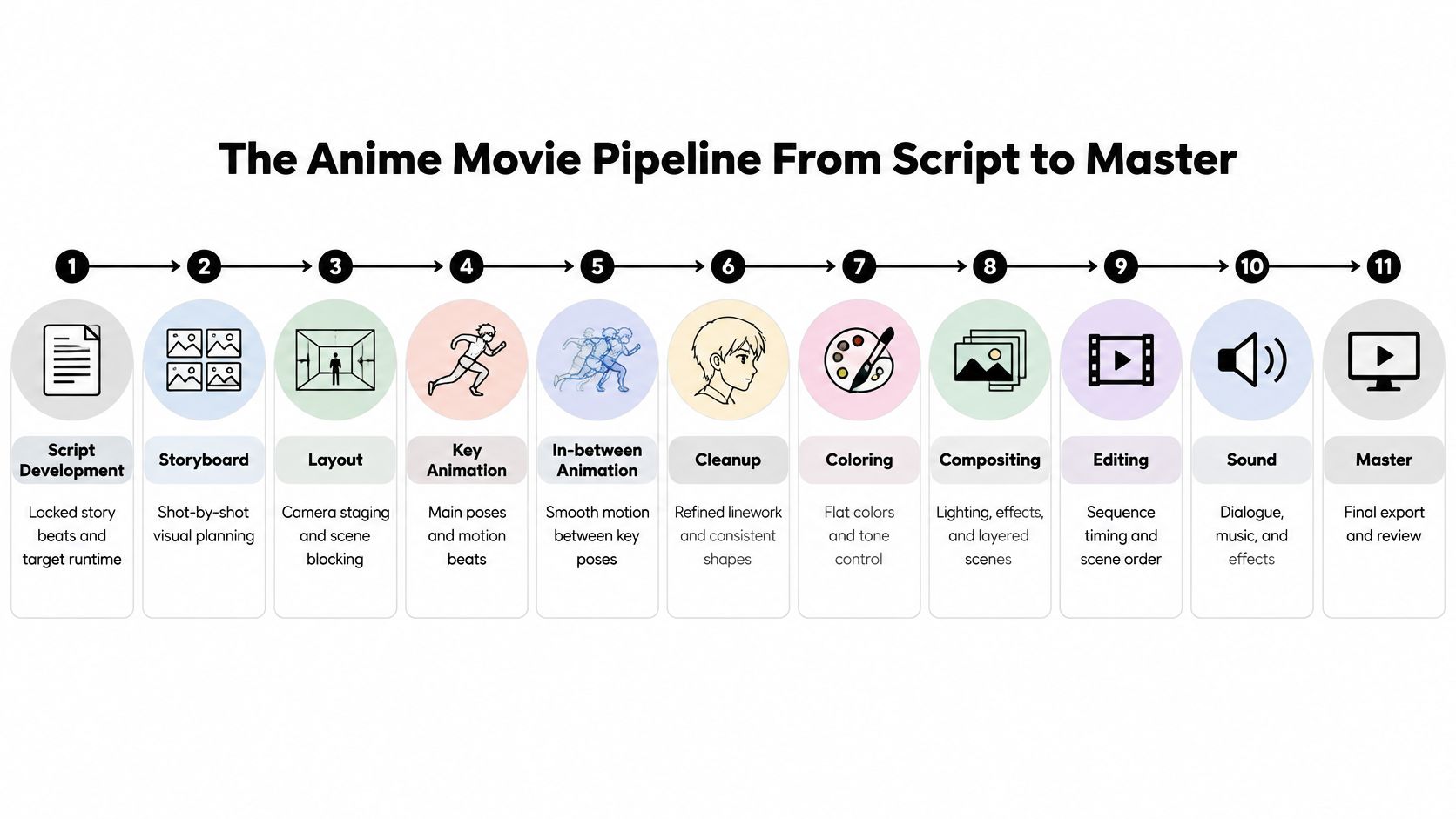
The Anime Movie Pipeline From Script to Master
Anime film production stages
| Stage | What gets made | Where AI tools help | Main risk |
|---|---|---|---|
| Script development | Story beats and runtime target | Brainstorming and mood references | Story drift without a locked script |
| Storyboarding | Numbered shot frames with movement arrows | Rough thumbnail variations | Unclear shot intent |
| Design sheets | Turnarounds, expressions and props | Style exploration | Model inconsistency across cuts |
| Animatics | Timed storyboard with temp dialogue | Temp voice and rough motion tests | Pacing problems found too late |
| Layout | Camera positions and staging per cut | Previs and framing tests | Expensive camera changes later |
| Key animation | Main poses and timing chart | Reference motion studies | Weak acting and unclear arcs |
| In-betweens and cleanup | Transitional drawings and clean lines | Assisted in-between drafts with review | Line weight and model drift |
| Compositing and effects | Layered shots and effects passes | Background generation and upscaling | Mismatched lighting and edges |
| Sound | Dialogue, music and effects | Voice samples and sound effects | Lip sync errors |
| Grading and final master | Colour pass and delivery file | Upscaled finals | Late corrections that touch many cuts |
This is your production reference, not a shopping list. The staged workflow turns a script into timed drawings, sound, and a finished master, following the foundational process described in Do You Know Japan's anime overview.
Keep the sequence visible wherever the team reviews work.
Separate design decisions from shot execution
Script development establishes what happens and how long the film should run. Storyboards translate that into numbered frames. Character, prop, and background sheets establish reusable assets, including turnarounds and expressions.
The animatic adds timing and temporary dialogue. Layout artists then define camera positions, perspective, and staging for each cut. Key animators establish the main poses and timing charts before in-between artists supply transitional drawings.
Cleanup artists resolve construction and linework. Digital paint applies approved palettes. Compositors integrate characters, backgrounds, lighting, and effects, while the editor maintains sequence timing.
Sound work includes dialogue, music, effects, and lip synchronization. Plan recording early enough to support acting decisions, even though the final mix comes later. Colour grading, quality control, and delivery checks produce the final master.
Commit scope before committing labour
Most cost is locked in during pre-production, in the sense that early choices determine the work you'll later purchase. A crowd scene, elaborate costume, or moving camera creates obligations across departments.
Separate reusable assets from shot-specific motion. A finished character turnaround can support many cuts. A complicated transformation usually needs its own drawings, effects, and review time.
First action: Write a one-page shot list and a rough stage calendar before buying a tool or hiring an artist.
Lock the Script and Storyboard Before Animation
A polished drawing can hide a weak scene. A rough storyboard exposes it while changes are still manageable. Historical reporting from AnimeNation describes major projects such as Princess Mononoke, Metropolis, and the Cowboy Bebop movie spending one to three years in production.
That's why story approval must be a production gate, not an informal opinion.
Use a repeatable approval routine
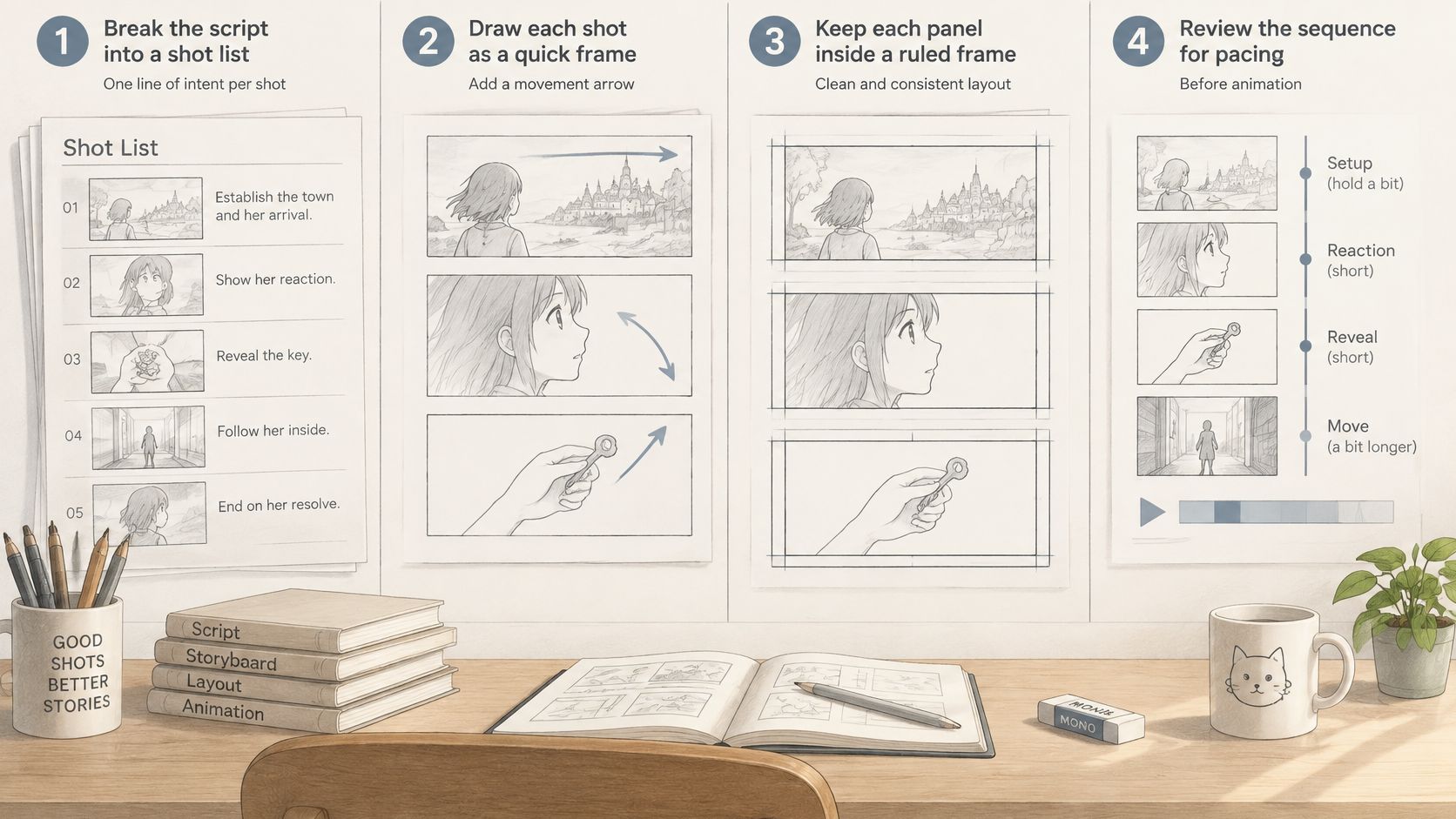
- Break the script into shots. Give each cut a line of intent, such as revealing a threat or showing a character hesitate. This prevents attractive shots that don't advance the scene.
- Draw rough frames. Use soft pencil, a ruled frame edge, movement arrows, and a shot number. Don't clean them up. The storyboard frame reference demonstrates this working-document approach.
- Build the animatic. Put the frames on an editing timeline with temporary dialogue. Test entrances, pauses, reaction beats, and transitions before anyone animates them.
- Test comprehension. Show it to three viewers who haven't read the script. Ask what happened and why. Record where they lose the story rather than explaining the missing information.
- Revise, then lock. Resolve confusing geography and weak motivations. Have the director and production lead approve the same board and animatic versions.
- Attach design references. Include the approved character, costume, prop, and background references in each shot package before key animation starts.
For turning written scenes into initial visual alternatives, script storyboarding with Bulk Image Generation is a useful planning resource. Treat generated frames as proposals, not approved staging.
Keep the physical drawing process equally simple.
Make changes accountable
A late camera adjustment can invalidate background perspective, character placement, effects, and compositing. A redesigned face can require new key drawings, mouth shapes, and cleanup. Changed dialogue can affect voice timing, music, and editing.
Storyboard frames are never final art or hero images. Their job is to communicate intent cheaply, not to prove how beautiful the finished film might look.
Log each revision round against the affected cuts. Record who requested the change, why it was necessary, and which departments must reopen work.
No shot goes to layout until its frame and timing are approved.
Plan Shots by Drawing Count and Exposure
Unique drawings by exposure
| Exposure | Unique drawings per second | Unique drawings for a 5-second shot | Best use |
|---|---|---|---|
| 1s | 24 | 120 | Fast action, impacts, camera moves, facial accents |
| 2s | 12 | 60 | Dialogue and general animation |
| 3s | 8 | 40 | Limited motion and held beats |
The table uses the 24 fps delivery rate and exposure definitions described by Magic Motion Studio: 1s use 24 unique drawings per second, 2s use 12, and 3s use 8; the shot totals are those rates multiplied by five seconds.
These are planning counts for continuous replacement of a drawing layer. They aren't a complete labour estimate. Holds can reduce the total, while additional characters, effects layers, redraws, and corrections add work.
Spend drawings where viewers need them
Exposure means how long a drawing stays on screen. Delivery at 24 fps doesn't require a newly illustrated image on every frame. A character can hold a pose while the camera moves, an effects layer changes, or another character speaks.
Reserve dense animation for motion that needs clear spacing and rapid change. Fast action, impacts, and selected facial accents are good candidates. For a camera move, assess character motion separately from the background or digital camera movement.
Dialogue often benefits more from deliberate poses and well-placed reactions than continuous movement. A convincing held expression can communicate more than a busy sequence of weak drawings.
The expensive mistake is committing to full animation before the acting works. More drawings won't fix unclear staging or an unconvincing pose.
Keep a shot register
Use a spreadsheet with a row for each cut. Record:
- Length and exposure: Include mixed exposure patterns, not just a single label.
- Key poses: Identify the acting beats and difficult transitions.
- Effects layers: Separate smoke, debris, water, lighting, and other animated elements.
- Integration: Mark whether the cut combines 2D and 3D assets.
- Background count: Distinguish existing assets from new environments.
- Review status: Name the approver and identify the current production stage.
Choose a small group of showcase cuts for dense motion and elaborate effects. Simplify secondary shots through holds, reusable cycles, and multiplane moves that shift foreground and background layers at different speeds.
Before commissioning in-betweens, approve the key animator's timing chart. It must communicate spacing, arcs, and drawing order clearly enough for another artist to execute without guessing.
Track minutes completed per department each week, then compare that output with accepted work at the cut review. A department that produces many minutes awaiting correction hasn't created the same usable capacity as one delivering approved cuts.
Staff the Crew and Plan Labor Capacity
Skilled labour is a larger scheduling risk than rendering capacity. Cartoon Brew's industry report, citing Association of Japanese Animations data, reports 310 anime titles in Japan in 2024, about 6,820 minutes of 2D animation, and fewer than 6,000 trained animators.
Those figures describe the report's industry context, not the staffing requirement for your film. The practical lesson is to book capable people early rather than assume you can add them when deadlines tighten.
Assign responsibility in production order
The core sequence is director, storyboard artist, character designer, key animator, in-between and cleanup artists, background artist, compositor, sound editor, and colourist. A small team may combine jobs, but each responsibility still needs a named owner.
Keep direction, story interpretation, character design approval, and key acting human-led. Supervising artists should approve assisted drawing work. The compositor, sound editor, and colourist remain responsible for whether their finished work supports the scene.
Connect each role to specific cuts in the register. A background artist needs an asset list and perspective requirements, not just a booking marked available. A key animator needs an approved package and a realistic review window.
Outsource in-betweens or backgrounds only against a locked written specification. Include shot count, exposure, model sheets, file conventions, delivery requirements, and review dates. Attach timing charts where motion is involved.
Book for the whole production
Feature schedules can span years. A crew plan must cover later corrections and finishing, not merely the opening animation push. Confirm whether artists can return for revisions before you depend on that availability.
- Map responsibilities. List each role against the shots in the register.
- Secure key animation. Book named artists or studios for the required production window.
- Schedule batch reviews. Set a fixed review date for every outsourced delivery.
- Reserve retake capacity. Hold an actual artist slot, not an optimistic note in the calendar.
Where AI Tools Fit in Each Production Stage
AI belongs in a supervised pipeline, not in a separate process where attractive outputs automatically become approved shots. The Computers, Materials & Continua paper on AI and anime production discusses experiments in generation and production assistance. That supports selective testing, not the assumption that an entire film can bypass artistic direction.
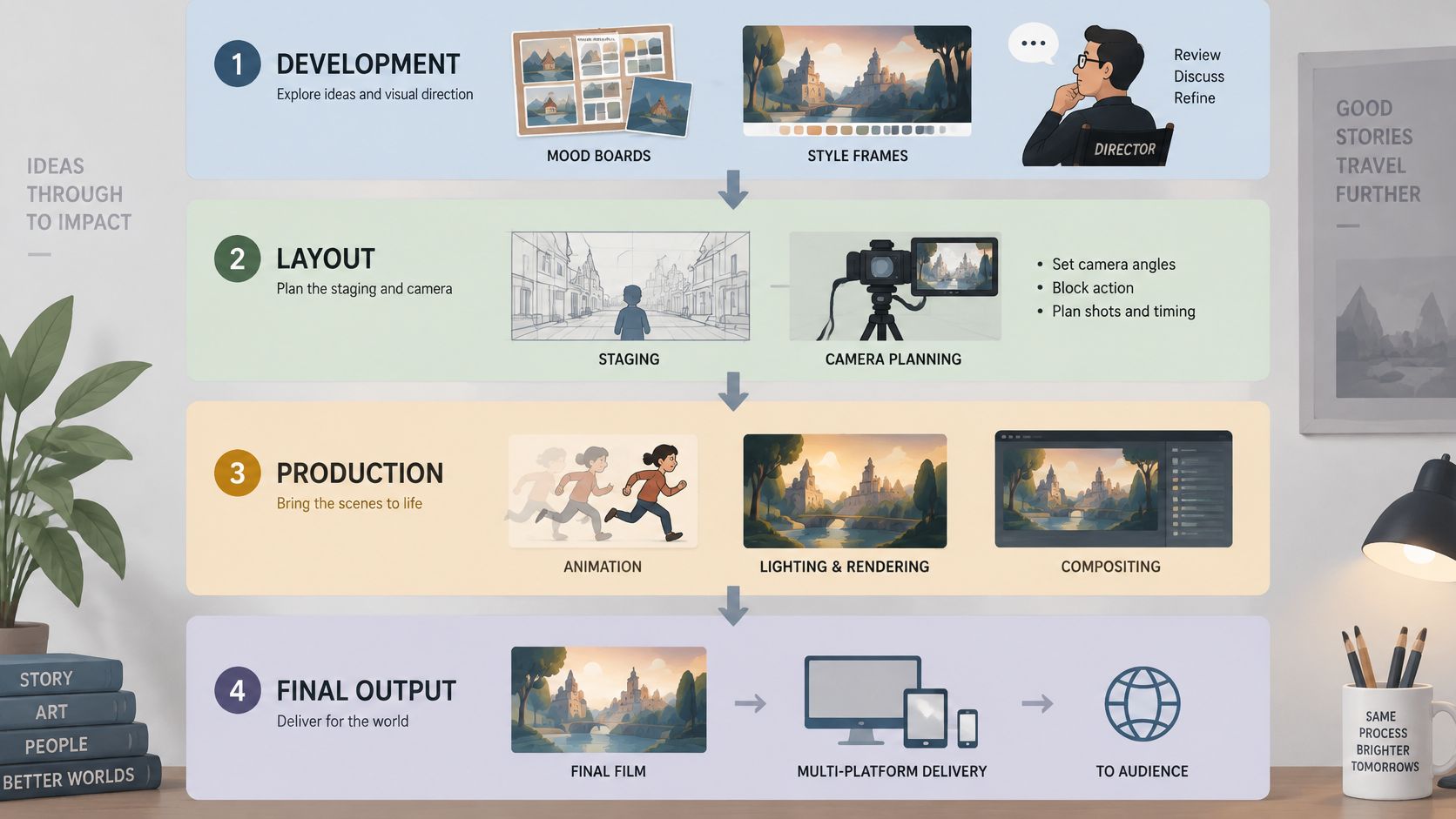
Use the production stages to decide who reviews each generated asset.
Match assistance to the task
- Development: Generate visual references, mood boards, and style frames. The director selects the visual language, and the designer converts exploration into coherent production references.
- Layout: Use quick previs variants to compare framing. Keep camera position, screen direction, and staging under human control.
- In-betweens and cleanup: Treat generated transitions as drafts. A supervising artist must check every frame against the model sheet and approved motion.
- Backgrounds: Generate candidate plates, then have a background artist correct perspective, geography, palette, and continuity.
- Finishing: Test upscaling and background removal on representative material. The compositor must inspect fine lines, edges, textures, and effects before accepting the result.
- Sound: Use permitted voice samples and sound effects to test ideas before final actor recording. The director still owns performance decisions, and the sound editor approves synchronization and the mix.
The anime image generation guide can help with visual exploration. A successful still image isn't proof that the same design will survive motion.
Judge the accepted shot, not the generation
Check for identity drift between cuts, temporal inconsistency across frames, incorrect acting beats, and style imitation. Keep acting beats, key poses, and final editorial approval human-led.
A pay-per-use workspace such as Visual Sandbox runs image, video, and audio models from one credit balance, with each test priced before it runs. We also use that shared balance for audio, 3D, and vector generation. Record generation costs alongside supervision and repair time so cheap drafts don't conceal expensive finishing.
Use the following video as a viewing reference, then assess any workflow against your own shot requirements.
Permission rule: Turning on our AI character setting confirms that every person in the images is an AI-made character. Never use that setting with a photo of a real person.
Stop testing a method when correction work exceeds the benefit. Regenerating endlessly isn't production progress.
Who Funds, Owns and Earns From the Film
A studio doesn't necessarily own the movie it makes. The EU-Japan Business Animation Workshop report describes production committees that can include a broadcaster, publisher, toy manufacturer, producer, advertisers, and an international sales or licensing agent. Members contribute financing and receive intellectual property and revenue shares based on investment, while the production company usually receives a production fee or margin.
Committees can divide broadcast, streaming, music, merchandise, home video, and overseas licensing rights, as explained in Japonity's production committee overview. Financing therefore determines who can approve deals and who earns beyond production.
Compare the independent routes
Funding routes compared
| Route | Ownership | Recoupment | Licensing control |
|---|---|---|---|
| Self-financing | Creator keeps full ownership | Recouped only from own sales | Creator sets all licensing terms |
| Grants | Creator usually keeps ownership, grant conditions may apply | No repayment but limited funds | Check grant conditions before licensing |
| Presales | Creator keeps ownership, buyers gain agreed territory rights | Recouped from advance payments | Buyers hold agreed territories |
| Co-production | Ownership shared by partners under agreement | Recouped through an agreed split | Partner approval needed for deals |
| Crowdfunding | Creator keeps ownership, backers may receive rewards | Recouped from pledges, no repayment | Creator controls licensing, reward terms may bind |
| Distributor deal | Distributor often holds rights for a set term | Recouped from minimum guarantee and split | Distributor controls terms in its territory |
Use these as deal structures to investigate, not promises about any contract. In particular, crowdfunding pledges fund production and reward fulfilment. They aren't evidence of later profitability.
Self-financing preserves control but leaves you carrying the loss. Grants can reduce that exposure without selling equity, although eligibility and permitted uses constrain spending.
Presales trade future territory income for money now. Co-production spreads the burden but requires explicit approval and accounting rules. Distributor agreements need careful definitions of expenses, recoupment order, territory, term, and rights reversion.
Sequel and merchandise rights need separate attention. Don't assume retaining the film's copyright automatically settles character licensing or follow-up projects.
The Japan Fair Trade Commission's anime industry release identifies labour as the largest production-cost category and notes outsourcing to freelancers. Fund the people doing the work before treating downstream revenue as profit.
Settle permissions before production
- Characters: Who owns the designs and sequel rights?
- Licensing: Who can approve a deal, and who receives the proceeds?
- Credits: How will AI-assisted work and human contributions be credited?
- Permissions: Which performer and training-data permissions are documented?
We make no promise that AI output is original, fit for a particular purpose, or free from third-party rights. Legal review still applies.
Fixing Schedule, Handoff and Consistency Problems
Production symptoms, causes and fixes
| Symptom | Likely cause | Fix |
|---|---|---|
| Characters drift between cuts | Model sheets missing or loose | Lock turnarounds and expression sheets, then check each cut against them |
| Retakes climb each review | Storyboard unclear or animation direction vague | Tighten shot notes and timing charts before the next round |
| Handoffs stall | Ambiguous layouts or missing references | Add approval gates after layout, key animation and before paint |
| Motion looks stiff | Too many shots on 2s or full animation started early | Move only the key action to 1s |
| AI frames break continuity | Identity drift or temporal inconsistency | Regenerate with fixed references and review every frame |
| Schedule keeps slipping | Compressed timeline or unverified team throughput | Reset the calendar using measured minutes completed per week |
The table is a diagnostic starting point, not an automatic prescription. Stiff movement may come from poor poses or spacing rather than exposure. Review the rough motion before authorizing more drawings.
Measure approval, not activity
Track retake percentage as cuts returned for correction divided by cuts reviewed in that round. Keep the counting unit consistent. Don't compare a round measured by drawings with another measured by complete cuts.
Also track accepted cuts per review round. Separate approved deliveries from conditional approvals that still need substantial work. Otherwise, the schedule will show progress that downstream artists can't use.
Rising retakes usually point toward unclear boards, inadequate model references, or vague animation direction. Faster rendering won't tell an animator which expression the director intended.
Write actionable review notes. Replace “make the reaction stronger” with a specific change to pose, gaze, timing, or silhouette. Have the animation director resolve conflicting feedback before sending a batch back.
Protect the handoffs
Establish approval gates after layout, after key animation, and before paint and compositing. Each gate should identify an approver, the required files, and the conditions for acceptance. Don't allow an unresolved camera decision to become a compositor's emergency.
For generated sequences, the character consistency workflow provides a useful reference for organizing continuity checks. Keep approved references and version identifiers attached to the cut, rather than buried in a chat thread.
A correction must also have a schedule consequence. Identify which dependent tasks stop and which can continue. Projectify's guide to measuring float in project schedules helps distinguish work that has timing flexibility from work that delays delivery.
A retake isn't finished when someone uploads a replacement. It's finished when the responsible reviewer accepts it.
When a cut fails repeatedly, pause the batch and repair the instructions. Sending the same ambiguous package to another artist merely moves the confusion.
Use the storyboard sign-off rule as the boundary for reopening story decisions. An approved cut can still need a change, but the production lead should authorize its scope and downstream cost.
Schedule compression and uncontrolled retakes are the most damaging pitfalls. Reset the plan around demonstrated throughput instead of asking every department to absorb an invisible backlog.
Make a One-Minute Pilot Before You Commit
Make a one-minute pilot before committing to the full film. Use six cuts: a dialogue cut, a fast action beat, a camera move, a background-heavy hold, a lip-sync scene, and an effects shot.
Run them through the complete pipeline, from storyboard to final grade. Fluidwave's approach to test, gather feedback, then refine is useful here because the pilot must test a repeatable process, not just produce a showcase.
Set a real production gate
- Measure throughput: Record minutes completed by department and retake percentage after each review.
- Count acceptance: Proceed only if accepted cuts rise round over round and the team holds its weekly schedule.
- Record total cost: Log every model run, including discarded results, plus artist review and repair time.
That ledger reveals the actual cost per finished cut before you scale. Include temporary audio and exploratory assets, not just the generations you keep.
If the pilot holds the schedule and retakes fall after the first two rounds, lock the shot register and start production this week. Otherwise, fix the storyboard and direction, then run the pilot again.
Visual Sandbox offers pay-per-use image, video, audio, vector, and 3D tools for testing assets within a supervised anime production workflow. Visit Visual Sandbox to build your pilot's references and motion tests, review the price before each run, and track what it takes to finish an accepted cut.