Image Generation Models: Types, Uses and How to Choose
November 26, 2026 · 16 min read

In August 2024, almost 40% of Americans aged 18 to 64 had used generative AI to some degree, and nearly one-third had used it daily or at least once in the previous week, according to a nationally representative survey analyzed by the Federal Reserve Bank of St. Louis. That figure covers all generative AI, not pictures alone. It still explains why so many briefs now include a request for an image.
Pictures are usually the first thing people make with these tools, and the model choice behind them is where most of the surprises live. Two systems can take the same sentence and return a photorealistic product shot, a flat illustration, or a label with a misspelled word.
This guide works from the ground up. What an image generation model is, the controls that change a single result, the cost and speed differences between providers, and a short test you can run on your own task before you commit to anything.
Table of Contents
- Image Generation Models at a Glance
- Three Differences That Matter More Than a Ranking
- What You Can Predict Now
- How Image Models Learn to Create Pictures
- Why the Same Prompt Gives Two Different Pictures
- A Short History in Three Moves
- Controls That Change Every Result
- Guidance Is the Control People Misread
- A Seed Buys You a Fair Test
- Cost and Speed Trade-offs Between Models
- Cultural Accuracy and Safety Checks Before Publishing
- Safety Depends on the Workflow, Not the Badge
- Matching a Model to Your Task and Testing It
- Three Worked Examples
- The Rule That Settles the Choice
- A Test You Can Run in an Afternoon
Image Generation Models at a Glance
An image generation model turns a text prompt, a sketch or a reference photo into a new picture. It learns how pictures relate to words by studying very large sets of image and caption pairs, then builds an image that wasn't in the training set.
These models are standard equipment now. Adobe reported that 86% of surveyed creators were actively using creative generative AI in 2025, a finding recorded in Gaugius's AI image generation statistics. The designers, marketers and hobbyists behind that number reach for a small set of model families, and the differences between those families explain most of what goes right or wrong in a session.
Image generation model families at a glance
| Model family | How it builds an image | Best at | Usual limitation |
|---|---|---|---|
| Diffusion models | Removes noise step by step until a picture appears | Photorealism, varied styles and detailed text prompts | Slower unless distilled or sped up |
| Generative adversarial networks (GANs) | A generator and a discriminator compete until outputs look real | Fast sampling and sharp results in narrow subjects | Hard to train and less varied across prompts |
| Variational autoencoders (VAEs) | Samples new images from a learned compressed space | Smooth variations between images | Outputs often look softer or blurrier |
| Autoregressive transformers | Builds image tokens one after another, much like words in a sentence | Layouts and text that follow the prompt closely | Can be slow at high resolution |
| Distilled few-step models | A compressed diffusion model that needs only one to a few steps | Quick previews and interactive tools | Less room for fine control at extreme detail |
| Editing and inpainting models | Changes only a masked area or uses an existing image as a base | Background swaps, retouching and product edits | Needs a source image to work from |
Three Differences That Matter More Than a Ranking
Every family answers three questions differently. How does it build the picture, and therefore what kind of error does it make? How fast does it run, and therefore where does it fit in a workflow? What does it do best, and therefore which task should you hand it?
Answer those and a leaderboard stops being useful. A sharp GAN portrait model built for one narrow category isn't automatically better than a diffusion model that handles fifty styles. It's faster and it's narrower, and both facts have consequences.
Speed questions usually lead to hardware. When a few hundred previews have to finish while someone waits, generation moves off a laptop and onto rented infrastructure, and running diffusion models on serverless GPUs shows how that setup works in practice.
What You Can Predict Now
Most tools a reader meets today sit on the diffusion line, meaning they build images by iterative denoising. The other families appear as specialists, distilled models for speed, editing models for retouching, autoregressive models for text-heavy layouts.
That's the useful part. Once you can name the family behind a tool, you can guess where it will be strong and where it will stumble, before you spend time testing.
How Image Models Learn to Create Pictures
Start with a photograph on a screen. Television static creeps across it, a few pixels at a time, until the picture is gone and only noise remains. Training an image model is that sequence studied backwards.
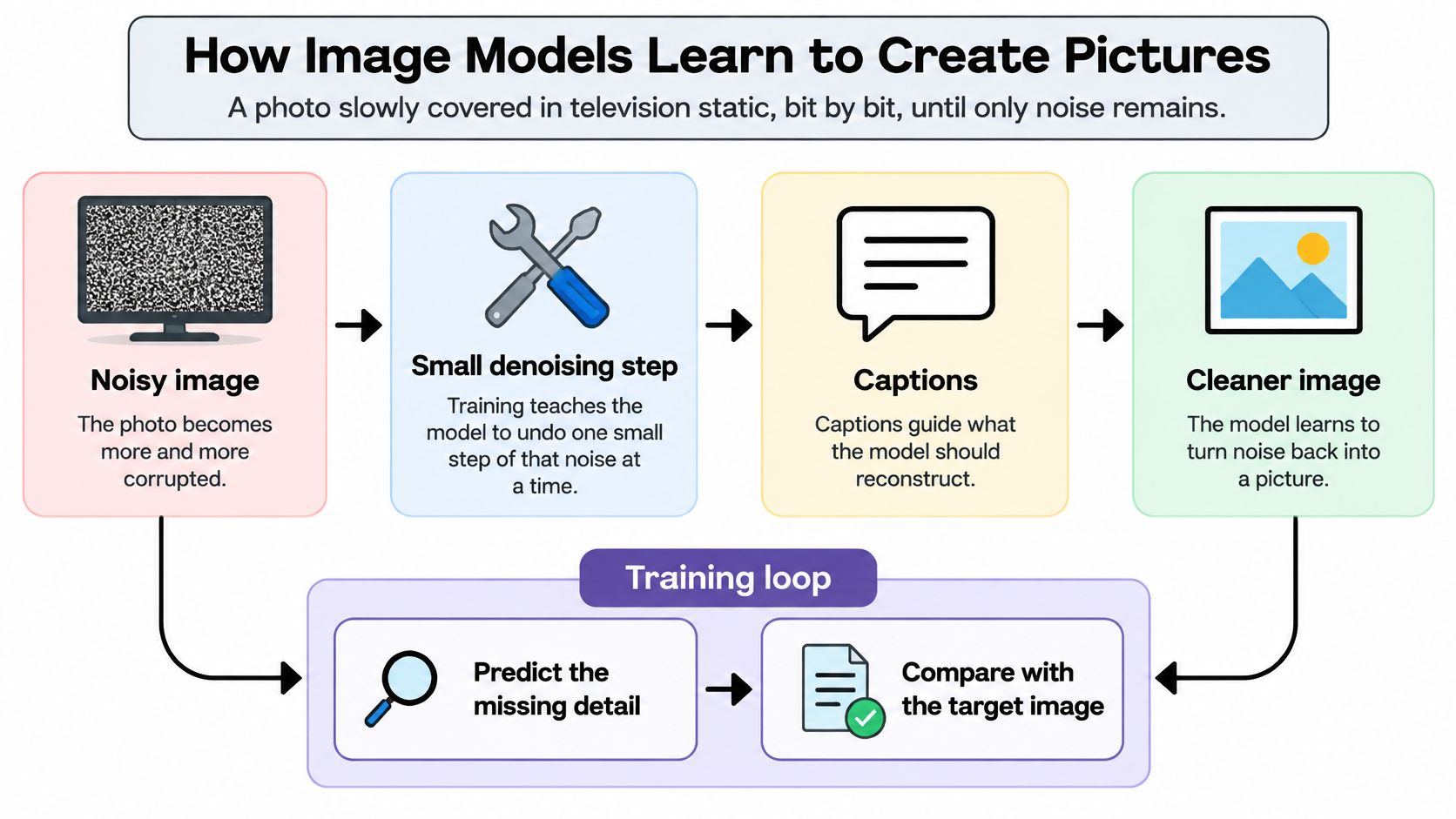
During training the model sees an original picture, its caption, and a partly destroyed copy. Its job is to remove a small amount of that noise and get closer to the original. Repeat it across enormous datasets and the model learns how edges behave, how skin looks, how light falls on glass. Generation runs the same process in reverse, starting from pure noise and removing a little at a time, with the caption steering every step.
Why the Same Prompt Gives Two Different Pictures
Each run begins from a different patch of random noise. Same words, different starting static, different finished image. That isn't a defect you can switch off completely, because the noise is where variation comes from.
It's also the reason the seed control exists. Fix the seed and the starting pattern is fixed too, so a composition holds still while you change a single word and watch what that word did.
The clip below makes those steps easier to follow than a paragraph can.
A Short History in Three Moves
Generative adversarial networks arrived in 2014, with a generator creating images while a discriminator tried to tell them apart from real ones. Variational autoencoders came earlier in the 2010s and learned probabilistic latent representations that could be sampled into new pictures. Diffusion and score-based models became a major research direction around 2019, and a 2021 paper titled "Diffusion Models Beat GANs on Image Synthesis" reported better sample quality than leading GAN systems on measures including Fréchet Inception Distance, Inception Score and precision, as a survey of image generation research recounts.
That shift moved the dominant approach from adversarial training to iterative denoising, and text-to-image systems then paired denoising with language conditioning over very large image and caption datasets. Stable Diffusion mattered because it worked in a compressed latent space rather than full-resolution pixels, which cut the compute behind a high-quality result.
Adoption followed. Adobe reported that 20% of Americans had used AI to generate images or videos as of 2024, one of the figures collected in Photoroom's AI image statistics.
The model doesn't copy a picture. It learns how to remove noise in a way that fits your words.
Controls That Change Every Result
The prompt gets the credit and most of the blame. Five other controls change the output just as much, and they're the ones people forget to write down.
Controls that shape a generated image
| Control | What it changes | Raising it | Watch for |
|---|---|---|---|
| Guidance strength | How closely the image follows the prompt | Closer prompt match | Oversaturated or unnatural colours |
| Sampling steps | How many refinement passes run | More fine detail | Slower runs with diminishing returns |
| Seed | The starting pattern of noise | Repeatable results | Same composition returning every run |
| Aspect ratio | The shape of the frame | Better fit for banners, posters or square feeds | Some models limit available sizes |
| Reference image | Style, subject or colour guidance | Stronger consistency across images | Copying the reference too closely |
| Negative prompt | Lists what to avoid | Fewer unwanted elements | Not every model supports it |
Guidance Is the Control People Misread
Guidance strength, often called classifier-free guidance, decides how far the model leans toward your wording versus its own sense of a plausible image. The classifier-free guidance research presented at NeurIPS states the trade-off directly: raising the guidance weight generally improves alignment between image and text, but can reduce visual fidelity by producing oversaturated or unnatural images.
Lower values keep colours natural and hand you more variety. Higher values enforce the brief. A product shot that has to carry exact label text usually needs stronger guidance, while a lifestyle scene often looks better a notch lower. Neither setting is correct in the abstract, which is where most forum advice goes wrong.
The same paper makes a second point worth stealing. Evaluation should report alignment metrics such as CLIP Score and fidelity metrics such as FID together, because tuning one alone hides what it costs. For production work, model-specific guidance sweeps on a representative prompt set are more reliable than a universal number, particularly for product photography, logos and images with dense textual constraints.
Practical rule: Set guidance by running three or four real prompts from your own library. A value copied from someone else's workflow is a guess about their model and their task.
A Seed Buys You a Fair Test
Fix the seed and the composition stays put. Change one word and you see exactly what that word did. Leave it free and every comparison mixes two changes at once, which is how a folder of images ends up with no explanation for why one worked.
If the wording itself needs work, the guide to writing prompts for an AI image generator covers subject order, sentence structure and style cues.
Four habits make a first test run readable:
- Fix the seed before anything else. It turns a lucky result into a repeatable one.
- Change one control per run. Two changes at once teach you nothing about either.
- Save the settings beside the image. Model name, version, guidance, steps and seed.
- Use prompts from the actual job. Pretty test prompts flatter models that fail on your actual brief.
Cost and Speed Trade-offs Between Models
A campaign can turn a few cents into a meaningful line item. One hundred drafts at 1.1 cents each cost about $1.10, while ten final images at 13.4 cents each cost another $1.34. The drafts carry the volume. The finals carry the value.
Cost and speed reference points
| Reference point | Value | What it tells you |
|---|---|---|
| Cheapest listed model | 1.1 cents per image (GPT Image 1 mini) | Budget drafts and high-volume work |
| Median of 35 compared models | 3.5 cents per image | A typical planning figure |
| Most expensive listed model | 13.4 cents per image (Nano Banana Pro) | Reserve for final, high-value assets |
| Finished 1024 by 1024 API image | 4 to 13.5 cents | Typical range across Google, OpenAI and xAI models |
| Stable Diffusion v1.5 on A100 80GB | About 1.78 seconds per image | Multi-step baseline for quality |
| Distilled few-step models | Near-real-time preview speed | Live previews and quick iteration |
A 2026 comparison of 35 image generation models found a median standard price of 3.5 US cents per image, ranging from 1.1 cents for GPT Image 1 mini to 13.4 cents for Nano Banana Pro, with 25 of the 35 models at 4 cents or less under standard settings, according to Tokely's image generation API price comparison. A separate pricing review puts a finished 1024 by 1024 image at about 4 to 13.5 US cents across Google's Nano Banana family, OpenAI's GPT Image models and xAI's Grok Imagine, per Bielfor's AI image pricing comparison.
Speed follows a similar pattern. Standard multi-step diffusion models spend more computation refining each image. Distilled few-step models compress that process, producing images far faster and making them useful for live previews. The trade-off works like sketching before painting: a quick sketch helps you test composition cheaply, while the finished painting receives more time and attention. Faster does not automatically mean better for final assets, especially when fine detail, text accuracy or precise control matters.
On Visual Sandbox, image generation starts at $0.01 per image across 21 image models. That spread makes model choice part of the budget rather than a technical afterthought. Use lower-cost models to explore variations, then reserve higher-cost models for images that will ship.
Treat published comparisons as snapshots rather than permanent rankings. Before committing, run the same representative brief through two or three candidate models, count the acceptable outputs and compare the cost per usable image. A model that costs twice as much can still be cheaper if half its results need no rerun. When that per-image number has to become a monthly production budget, ProdSnap pricing plans show how per-unit generation costs can be packaged.
Cultural Accuracy and Safety Checks Before Publishing
A sharp, photorealistic image that follows the prompt looks finished. A fair number of them are wrong in ways no quality score catches, and the gap opens fastest in markets outside North America and Western Europe.
The CulturalFrames study found that text-to-image models missed cultural expectations 44% of the time across models and countries, and that standard evaluation metrics correlated poorly with human judgments of cultural alignment. The same research points to a consistent pattern: countries with less representation in training data tend to receive weaker cultural handling, so a model that performs well on familiar Western scenes can degrade as the target market moves further from that center.
Those failures survive a high prompt-adherence score because the model renders something plausible rather than something local. A street scene can be beautifully lit and still carry the wrong roof pitch, the wrong garment, or the wrong dish on the table. Plausibility is the trap. The image looks correct to anyone who does not know the market, which is exactly the audience least able to catch the error.
Safety Depends on the Workflow, Not the Badge
A 2025 study of ten Stable Diffusion models found that harmful prompts could produce sexual, violent and personally sensitive imagery, with troubling racial and gender patterns, including disproportionate portrayals of Black individuals in violent contexts, as the study published in Scientific Reports reports. The same work audited DALL-E 3, Midjourney 6.1 and Stability AI Core and found stereotypical visual cues in geocultural, occupational and adjectival prompts. Targeted prompt refinement cut the measured stereotype index by 61% for geocultural prompts and 69% for occupational prompts.
Notice what moved the number: the prompt and the revision process, not the model name on the badge. That is the practical lesson. Safety behaves less like a feature you can buy and more like a habit you build into the workflow, since risk depends on the prompt, the reviewer, the deployment context and the provider's usage terms. Those terms are worth reading before a commercial campaign rather than after one.
Letterforms are a separate failure mode that no cultural reviewer can fix, and this look at AI image models and text rendering explains where they break.
A pre-publication sequence that holds up:
- Test prompts for each target market. Write them in the local language where you can, since a prompt written in English and aimed at another culture inherits assumptions from both.
- Use native reviewers and reference images. Someone who lives in the market spots the wrong roof or the wrong garment faster than any score, and reference photos give them something concrete to check against.
- Score three things separately. Object identity, cultural context and visual realism fail independently, so one blended score hides which part broke.
- Check every output against prohibited-content rules. Do it before the file reaches a designer's folder, where it starts to look approved by default.
- Send any image containing people to a human reviewer. Demographic and cultural audits belong to a person, not a filter.
- Log the model version. A silent upgrade changes what the same prompt returns next month, and the log is the only way to trace why.
Matching a Model to Your Task and Testing It
A ranked list can't choose for you. Your task can. Find the requirement you can't compromise on, then pick the family that handles it best.
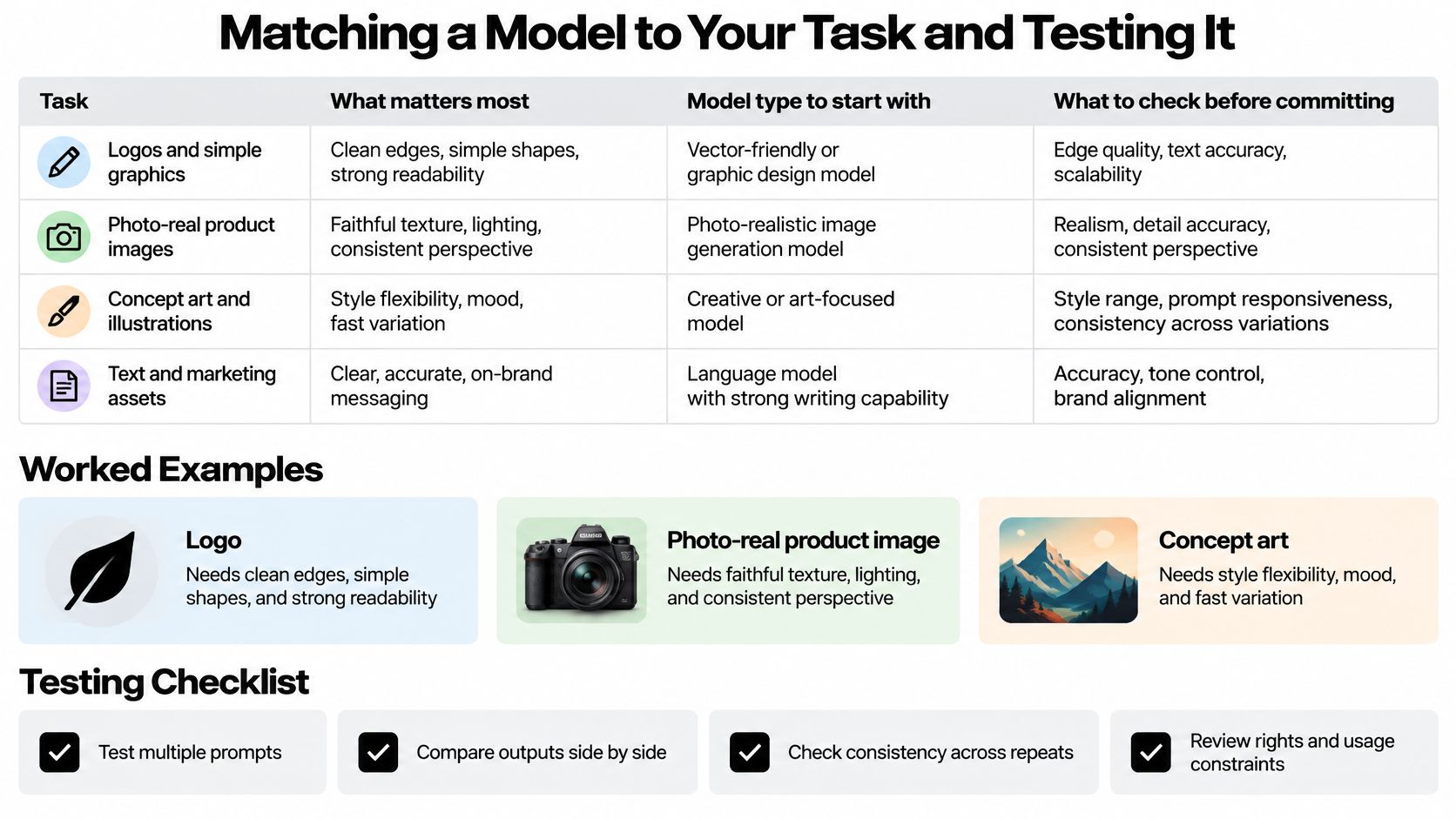
Model type to start with, by creative task
| Creative task | What matters most | Model type to start with | Check before you commit |
|---|---|---|---|
| Product photos | Accurate materials and true colours | Diffusion model plus an editing model | Compare product shape against the real item |
| Logos and icons | Clean shapes and legible lettering | Text-strong model, then vectorise | Test at small sizes and in one colour |
| Stylised illustration | Consistent style across images | Diffusion model with a reference image | Run three images in a row and compare style |
| Posters with text | Correct spelling and layout | Autoregressive or text-strong model | Proofread every word in the output |
| Fast previews | Speed and low cost per run | Distilled few-step model | Confirm the final tier before production |
| Final hero assets | Fine detail and resolution | Multi-step diffusion model | Inspect hands, edges and small text at full size |
Three Worked Examples
A logo brief has one hard constraint: legible letters on a clean shape. Start with a text-strong model, generate at large size, then vectorise the winner so it scales without softening. Check it at 24 pixels and in a single colour, because that's where a generated mark usually falls apart.
A shop banner is the opposite. Materials and product accuracy decide whether it sells, so a diffusion model builds the scene and an editing model repairs only the product area afterward. Compare the product silhouette against the item at full size, and confirm the packaging colour hasn't drifted. When that banner becomes a paid ad, ShortGenius can assemble the ad around the finished creative. Cleanup passes sit between generation and publishing, and the guide to AI photo editing covers the retouching steps that fix edges, backgrounds and colour.
A children's book needs the same character on every spread, which is a consistency problem rather than a quality problem. Use a reference image, fix the seed and the style settings, then generate three spreads in a row and compare them side by side. If the character's face drifts by the third image, the reference is too weak or the style wording is too loose.
The Rule That Settles the Choice
Match the model to the hardest requirement first, then verify the rest. A diffusion model with gorgeous lighting won't rescue a misspelled poster, and an autoregressive model with perfect text won't give you believable skin texture on a product shot.
Start with the constraint you can't compromise on. Aesthetic preferences are negotiable. A wrong logo shape or a wrong word isn't.
A Test You Can Run in an Afternoon
- Pick three real prompts from the job. A product shot, a logo brief, and a scene set in your target market.
- Run each one on two model families at a low-cost tier and one at a higher tier. Keep the prompt identical across all three, with no provider-specific rewrites.
- Score each result on prompt match, detail, cultural fit, text accuracy and cost per run. Five columns, one row per output.
- Pick the family that wins on the hardest requirement, then record the seed, guidance setting and model version. That record is what makes next month's batch reproducible.
Visual Sandbox is a pay-per-use workspace where models such as GPT Image 2.5 Flare, Nano Banana Pro, FLUX 3 Image Klein and Krea 3 sit behind the same prompt box, so your three prompts can be compared side by side with the price of each run shown before it starts.
The fastest way to settle the model question is to make the pictures. Visual Sandbox brings image, video, audio, vector and 3D generation into one pay-per-use workspace, so you can run your three test prompts across several image models, see the cost of each run before it begins, and keep the prompts, seeds and settings that won. Start with the requirement your project can't compromise on, and let the side-by-side results pick the model. Visit Visual Sandbox to run the test.